About HTTP API
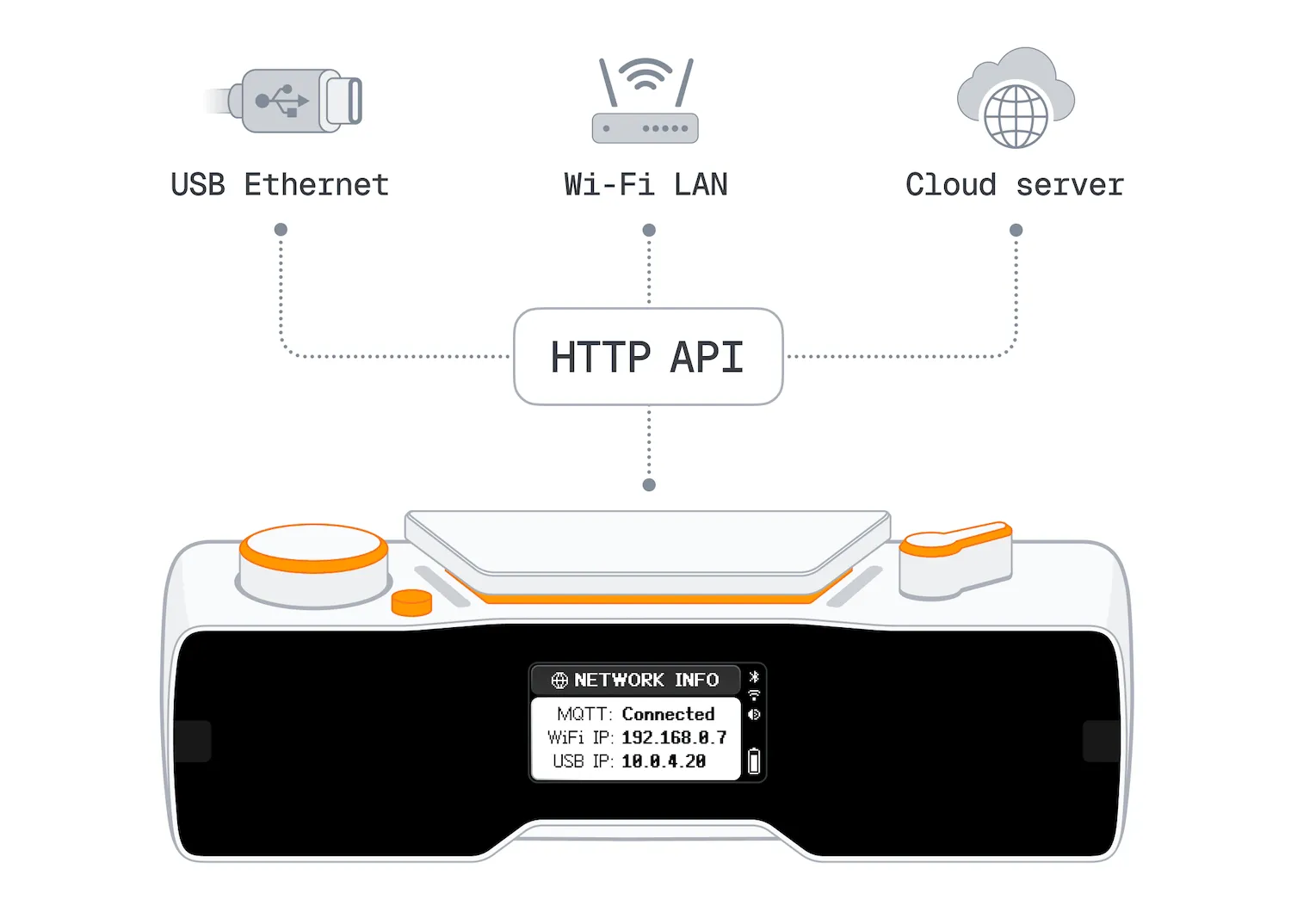
The open HTTP API lets you fully control your BUSY Bar using your own scripts, applications, or services in any programming language. The HTTP API is available over USB, Wi-Fi, and the internet.
On this page, you’ll learn about the HTTP API:
- Capabilities%section%Capabilities
- Authentication%section%Authentication
- HTTP API reference%section%HTTP API reference
- Try the API from the HTTP API reference%section%Try the API from the HTTP API reference%section%
- Display an image and text using a Python script%section%Display an image and text using a Python script%section%
- busylib libraries%section%busylib libraries
Capabilities
- Timer control — control the BUSY and CUSTOM modes
- Display control — render text and images on both displays, adjust brightness
- Audio control — upload and play audio files, adjust volume
- Real-time updates — get display frames and BUSY Bar state changes over WebSocket
- Input simulation — emulate button presses and scroll wheel events
- File management — upload, organize, and delete files stored on the BUSY Bar
- Firmware updates — update firmware from a local file or over the internet
- Wi-Fi and Bluetooth — scan and connect the BUSY Bar to Wi-Fi networks, enable BLE advertising, remove BLE pairings, and check connection status
- BUSY account — link or unlink the BUSY Bar with your account, get account info
- Matter integration — connect the BUSY Bar to your smart home
- System config — set the BUSY Bar name, system time, time zone, and more
- System info — get BUSY Bar status, power, and firmware details
How it works
The HTTP API follows a client-server architecture. The BUSY Bar acts as an HTTP Server, listening for incoming requests from an HTTP Client. When the BUSY Bar receives a request, it processes it and generates a response.
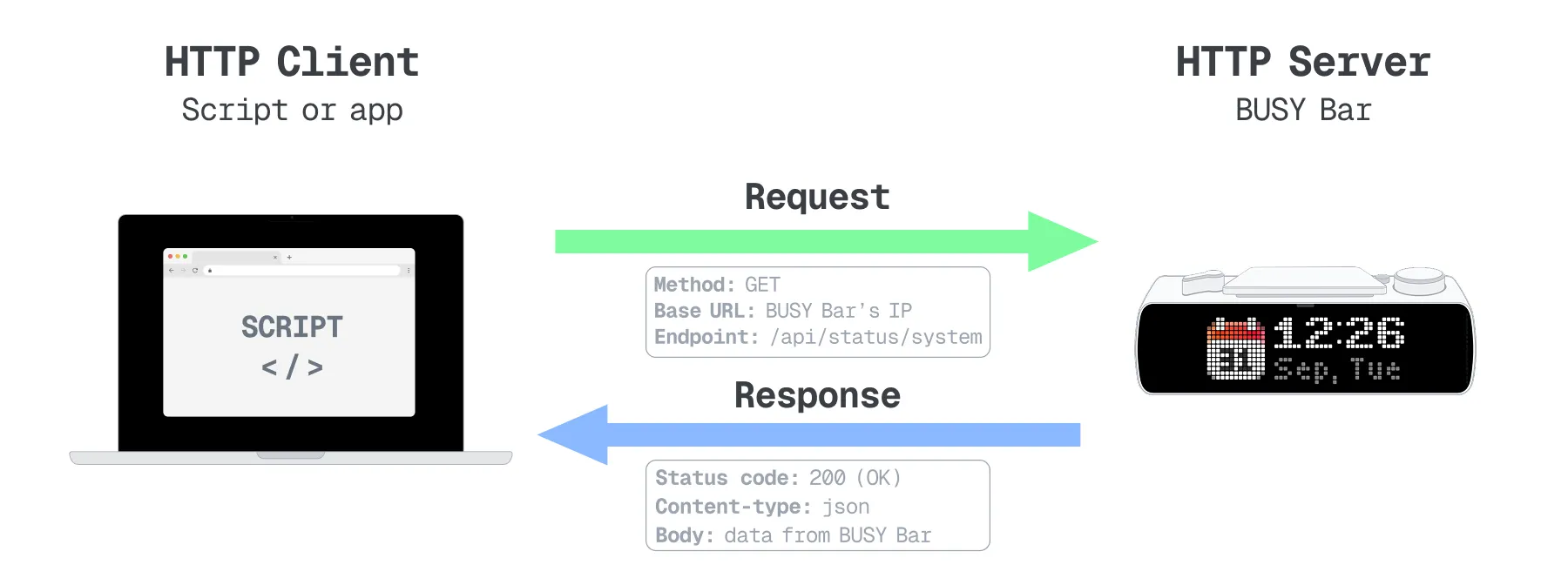
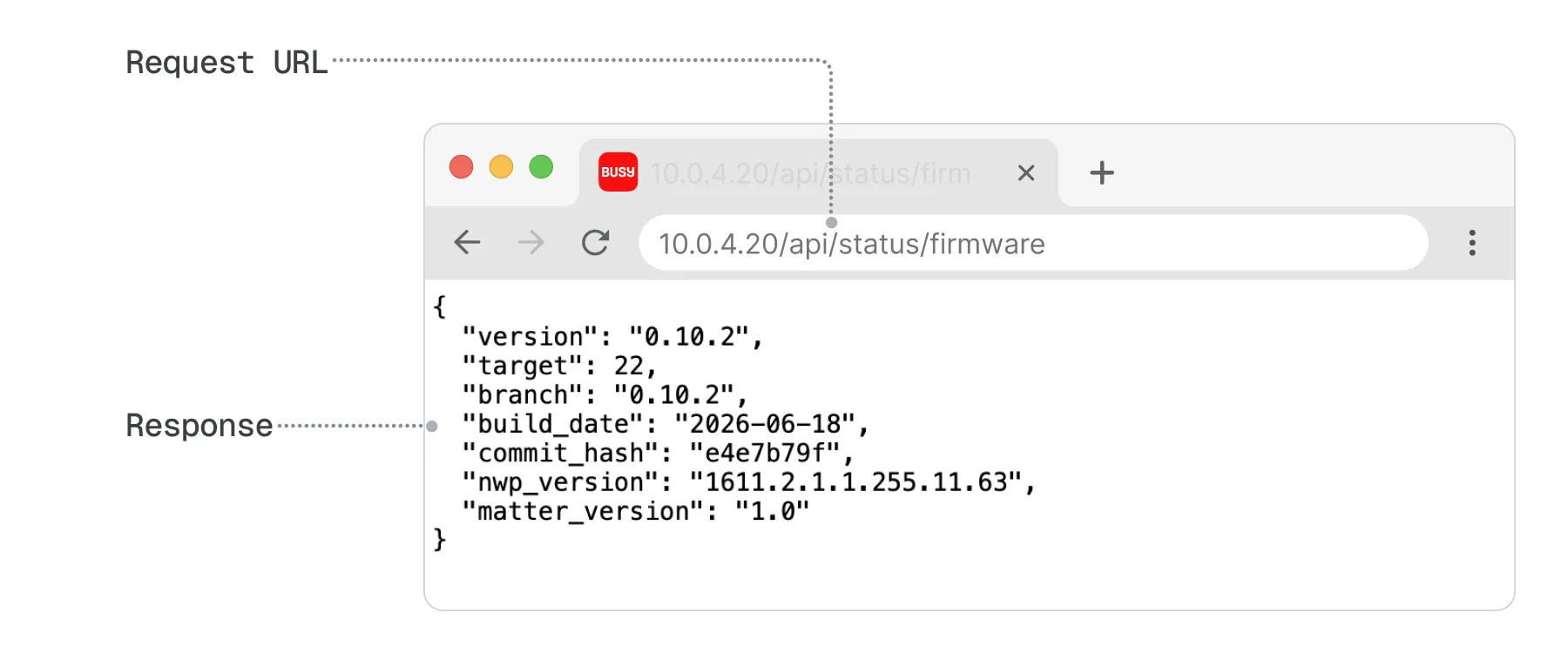
The HTTP client can be any application capable of sending HTTP requests, such as a smart home system, a script, a desktop or mobile application, or even a web browser. For the simplest test, connect BUSY Bar to your computer via USB and enter: 10.0.4.20/api/status/firmware. The browser will send an HTTP request to your BUSY Bar and display its response:
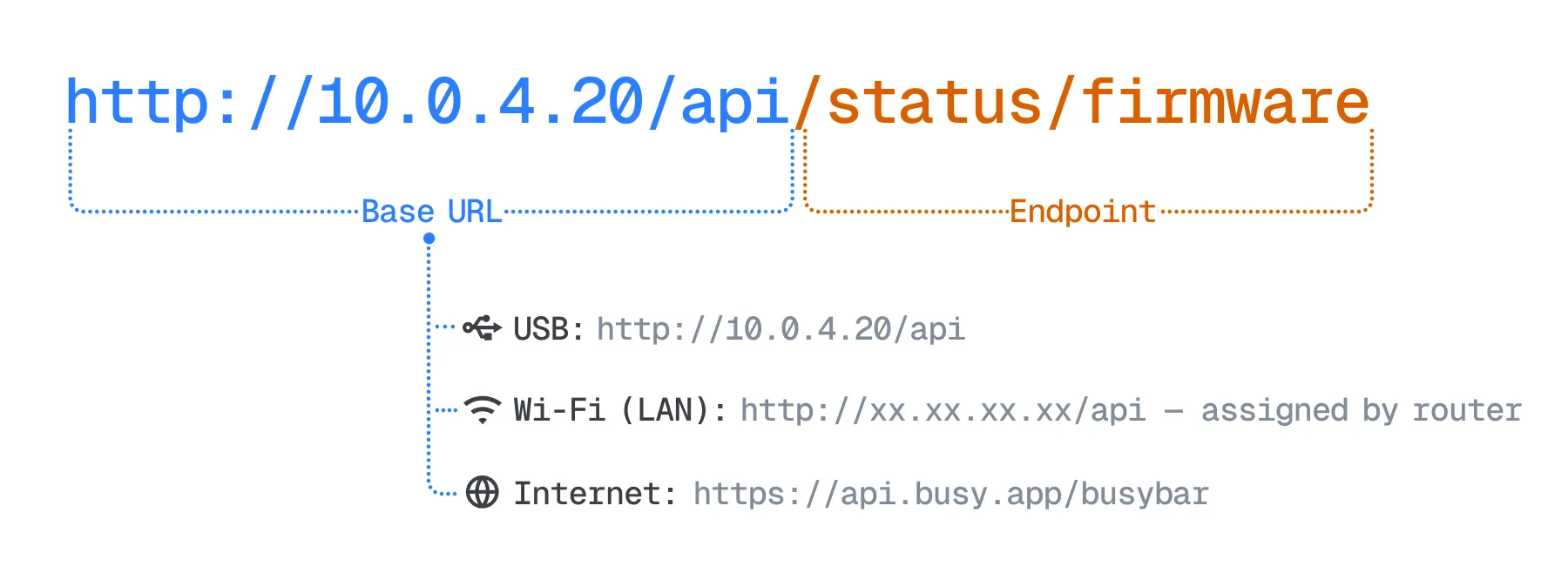
An HTTP request URL consists of:
- Base URL, which depends on how BUSY Bar is connected.
- Endpoint, which identifies the type of request to BUSY Bar. All available endpoints are listed in the HTTP API reference.
Base URL
The base URL for HTTP API requests depends on how your BUSY Bar is connected:
Connection method | Base URL | Authentication |
|---|---|---|
USB | http://10.0.4.20/api | Not required |
Wi-Fi (LAN) | http://XX.XX.XX.XX/api | Required |
Internet | https://api.busy.app/busybar | Required |
 For Wi-Fi connections
To find your BUSY Bar's IP address, go to Settings → Wi-Fi → [Your Wi-Fi AP name] → View IP Address.
Authentication: Wi-Fi (LAN) and internet connections require authentication. For details, see Authentication%section%Authentication
Wi-Fi access
Enable Wi-Fi access to control BUSY Bar over Wi-Fi
Wi-Fi (LAN) connections to BUSY Bar are disabled by default for security reasons.
To enable Wi-Fi access to BUSY Bar:
Connect your BUSY Bar to a computer via USB.
Open the BUSY Bar local web interface in a web browser: http://10.0.4.20
On the Network tab, in the HTTP API section, turn on HTTP API access.
Click Set password and enable, and set a password.
From now on, your BUSY Bar will ask for this password every time you log in to the web interface via Wi-Fi. You’ll also need to include this password in all HTTP requests for authentication.
Authentication
Authentication is how the device verifies that an incoming HTTP API request was actually sent by its owner or someone the owner trusts. Without authentication, BUSY Bar returns a 403 Forbidden error in response to the request.
The authentication method depends on how you connect to BUSY Bar: via USB, Wi-Fi, or the internet.
 Via USB
A USB connection is considered a secure communication channel, so authentication is not used over USB. You can send any HTTP API requests to the device at its IP address 10.0.4.20 without authentication.
 Via Wi-Fi (LAN)
HTTP API requests over Wi-Fi are authenticated using a password that is set in the local web interface. Wi-Fi access must be enabled first. Learn how to enable Wi-Fi access.Learn how to enable Wi-Fi access.
Include this password in the X-API-Token header for every HTTP request sent to the BUSY Bar over Wi-Fi.
Here are a few examples:
curl -X GET \
  "http://[BUSY Bar IP address]/api/status" \
  -H "Accept: application/json" \
-H "X-API-Token: <your password>" Via internet
When connecting over the internet, requests are authenticated through an API token. You can generate and manage tokens in your BUSY account. Learn how to manage API tokens.managing API tokens
Include your API token in the Authorization header using the Bearer authentication scheme for every HTTP request sent to the BUSY Bar over the internet.
Here are a few examples:
curl -X GET \
  "https://api.busy.app/busybar/status" \
  -H "Accept: application/json" \
-H "Authorization: Bearer <your_api_token>"HTTP API reference
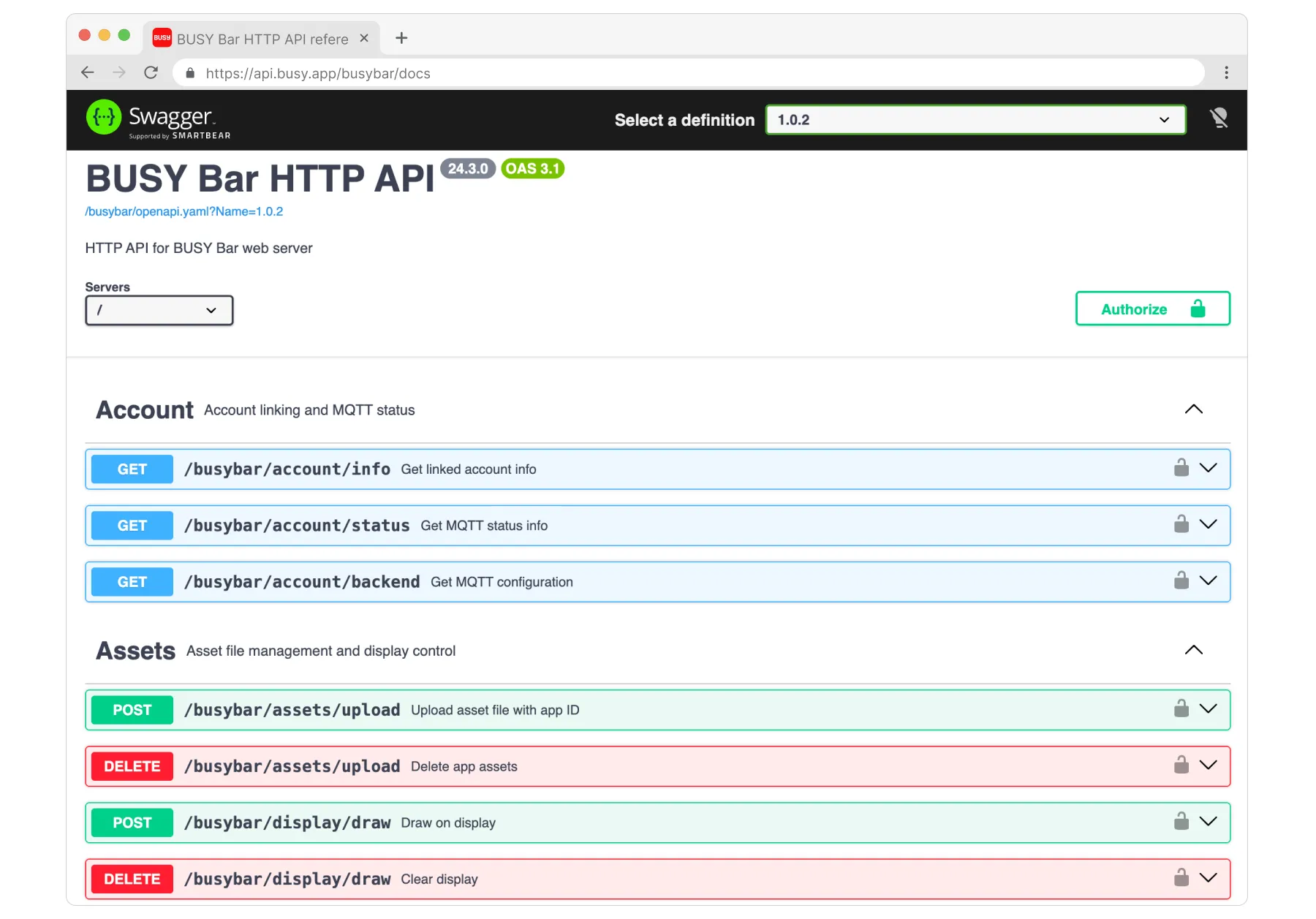
HTTP API reference is an interactive page where you can:
- Browse all HTTP API endpoints — view all supported API requests.
- View the API schemas that describe the JSON objects used by the HTTP API.
- Download the openapi.yml file, which contains the HTTP API specification in the OpenAPI format.
- Test any API request. Expand the desired endpoint, click Try it out, edit the request parameters or body if necessary, and then click Execute.
How to open the HTTP API reference
You can open the HTTP API reference in one of two ways:
Option 1: From the BUSY Bar local web interface
Open the following URL in your web browser:
- http://10.0.4.20/docs (when connected over USB)
- http://<BUSY Bar IP address>/docs (when connected over Wi-Fi)
Alternatively, open the Network tab in the local web interface and, in the HTTP API section, click either Over USB or Over Wi-Fi.
This opens the HTTP API reference hosted directly on the BUSY Bar. It documents the version of the HTTP API implemented in the device’s firmware. When you test API requests from the reference page, they are sent directly to the BUSY Bar over Wi-Fi or USB.
Option 2: Public HTTP API reference
Open the following URL in your web browser: https://api.busy.app/busybar/docs
In the page header, select your BUSY Bar firmware version to view the corresponding HTTP API reference.
When you test API requests from the public reference page, the requests are sent to your BUSY Bar over the internet through our cloud service.
Try the API from the HTTP API reference
You can send requests to your BUSY Bar right from the HTTP API reference. In the example below, you’ll show text on the front screen and an image on the back screen.
Step 1. Authenticate (if needed)
To try API requests, you may need to authenticate first, depending on how you access the HTTP API reference:
- Over USB (http://10.0.4.20/docs) — no authentication needed, just send requests
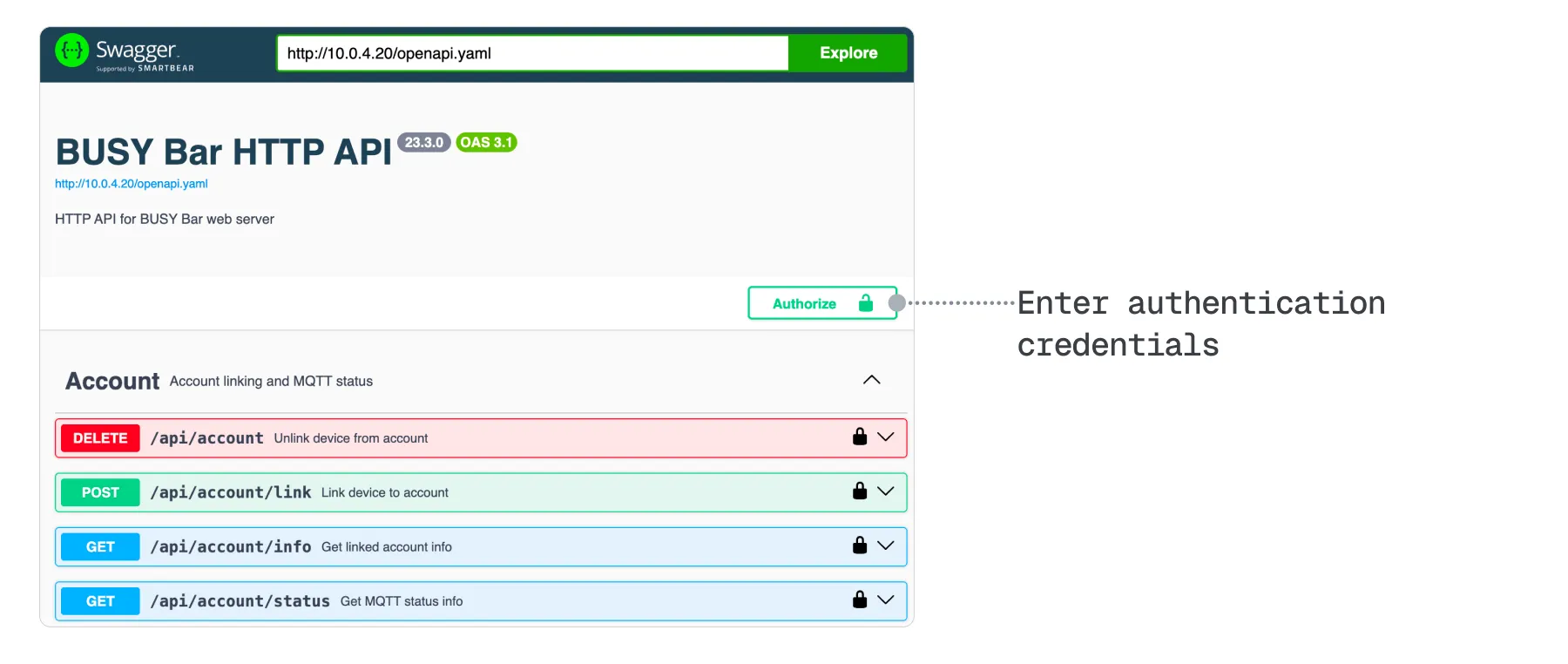
- Over Wi-Fi (http://<BUSY_Bar_IP_address>/docs) — click Authorize and enter the password you set when enabling Wi-Fi accessenabling Wi-Fi access
- Over the internet (api.busy.app/busybar/docs) — click Authorize and enter an API tokenAPI token generated in your BUSY account. When creating the token, select BUSY Bar under Access scope
Step 2. Upload an image for the back screen
Use a 160x80 px PNG image for the back screen
The file must be no larger than 255 KB. You can download our example image:
Try the endpoint that uploads an image:
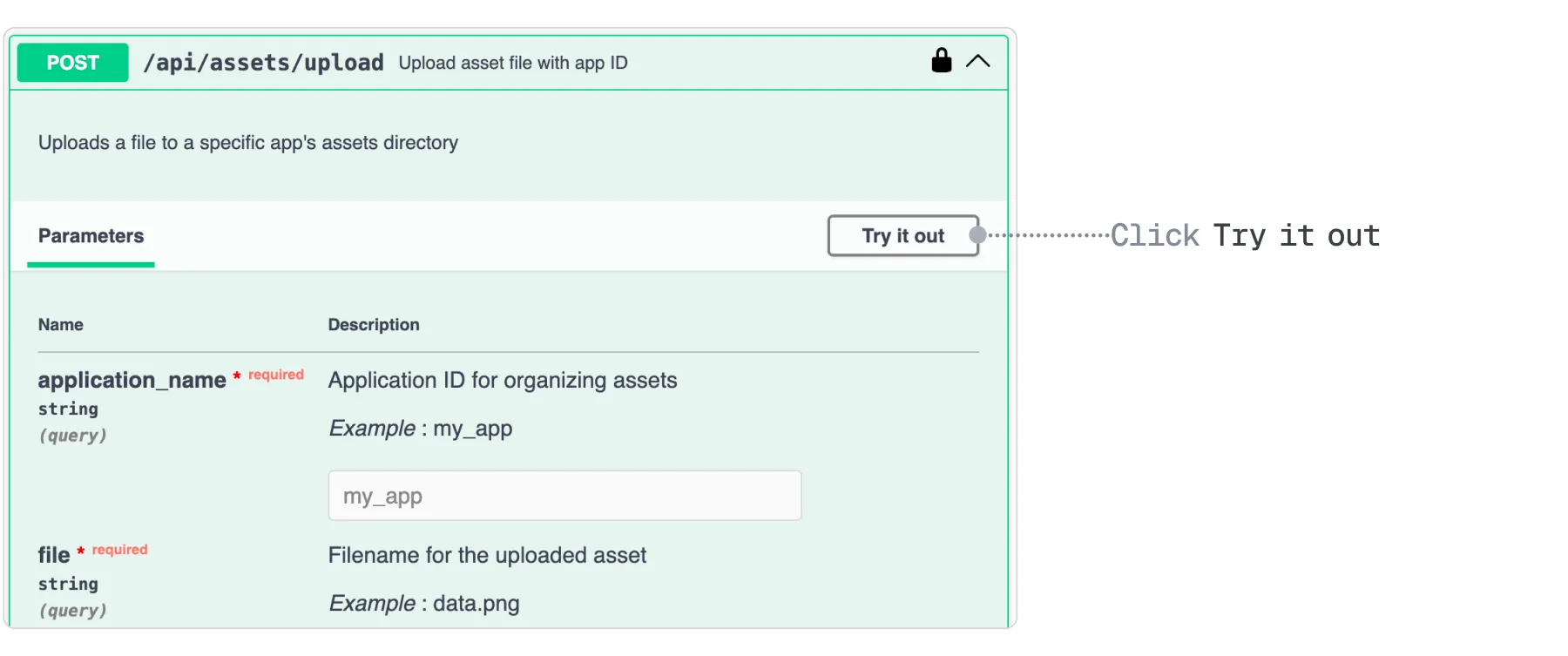
In the Assets group, expand POST api/assets/upload and click Try it out.
In the Request body, click Choose file and select your file.
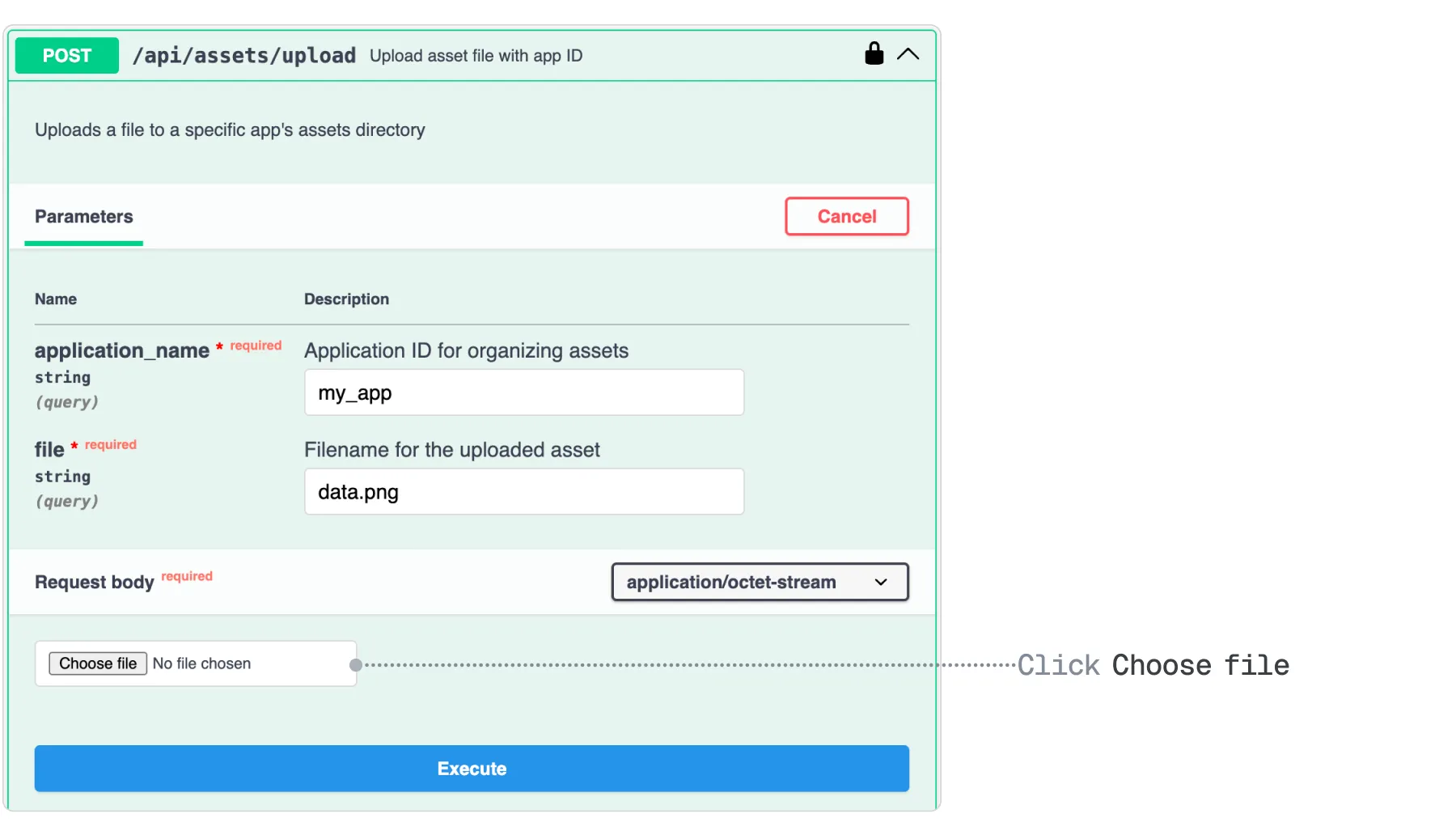
Click Execute to upload the file to your BUSY Bar.
The image is now in your BUSY Bar’s memory. To show it, continue to Step 3.
Step 3. Display text and an image on the BUSY Bar screens
Scroll down to the POST /busybar/display/draw endpoint.
Expand the endpoint and click Try it out.
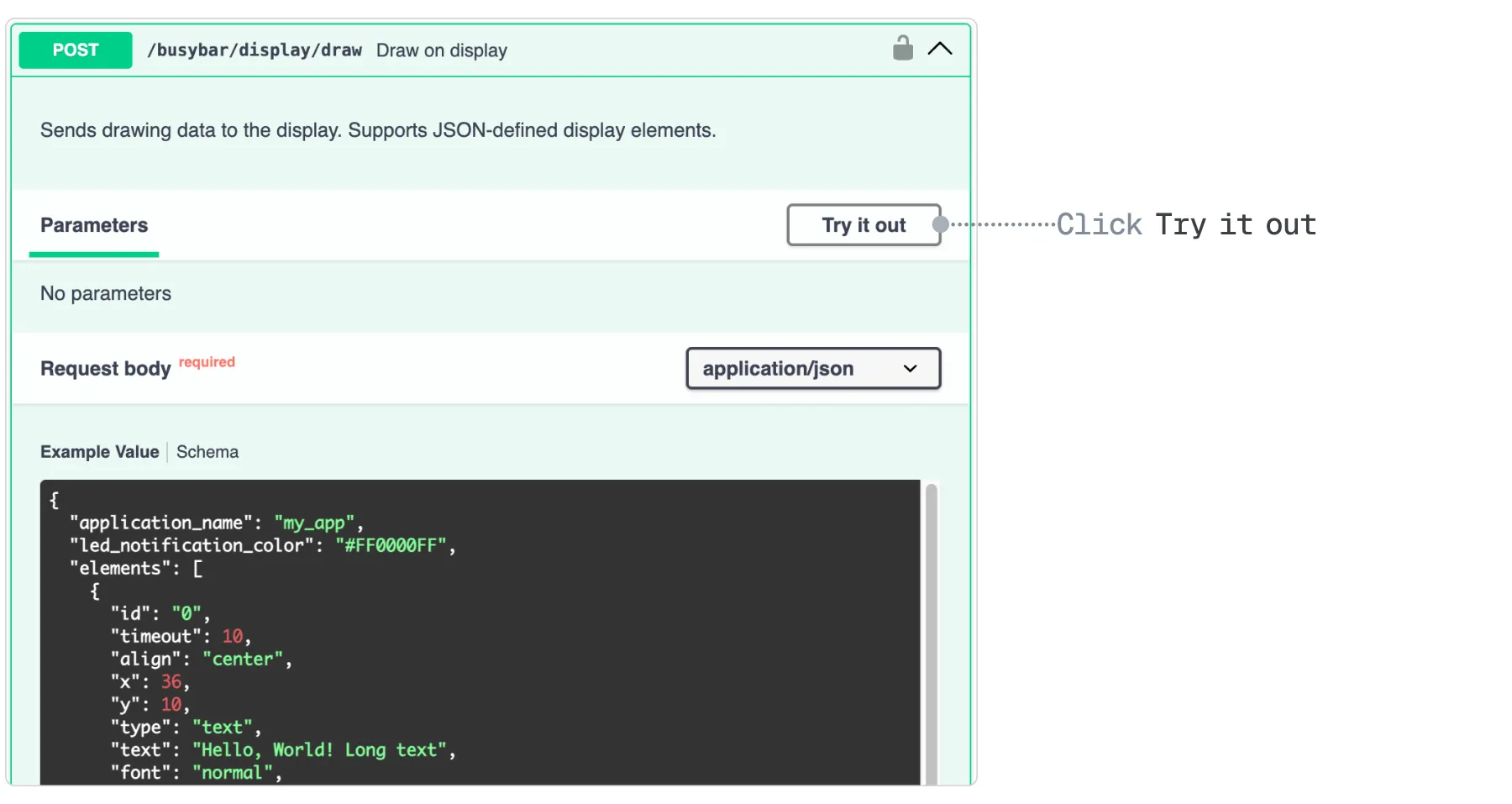
(Optional) Edit the request body.
For example, change the text parameter to show a different text.
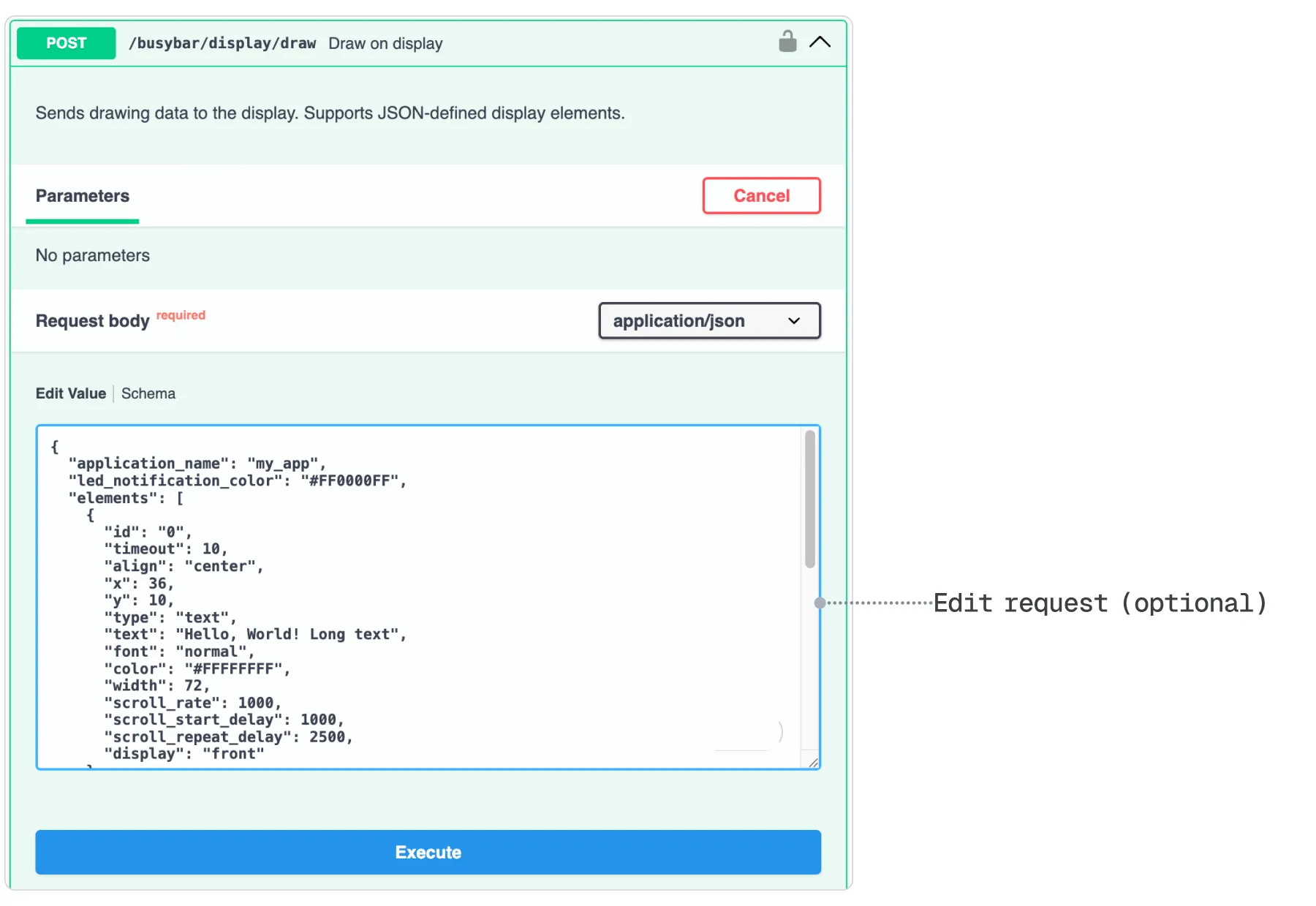
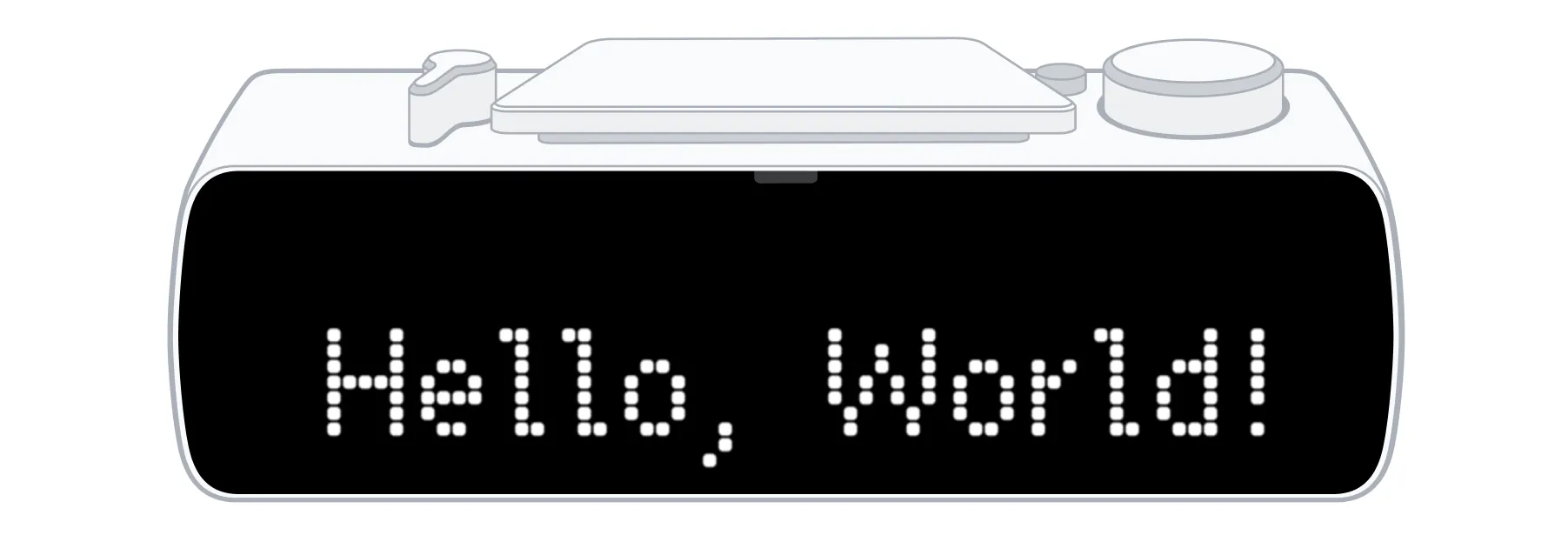
Click Execute. Your BUSY Bar will show the text on the front screen and the uploaded image on the back screen.
Display an image and text using a Python script
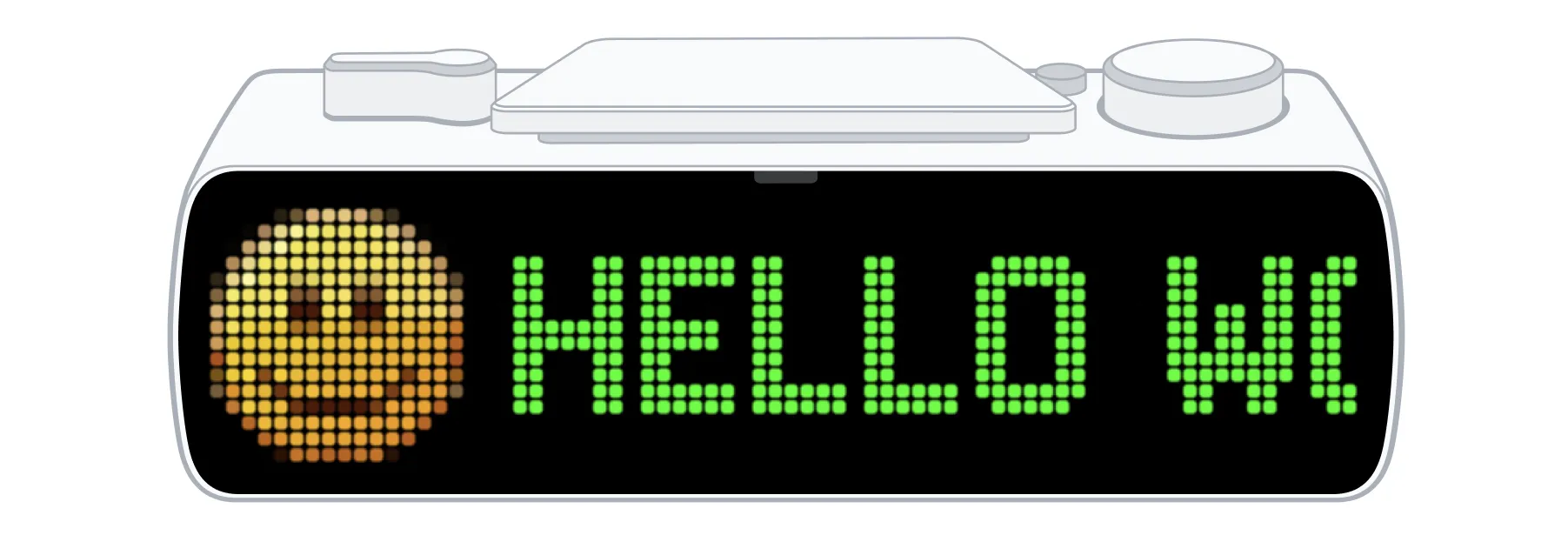
Now let’s try controlling BUSY Bar with your own code. The Python script below uses the HTTP API to upload a small image and display it on the front screen together with a text message.
Step 1. Create the script file
Copy and paste the contents of this block into a file named test.py and save it:
Step 2. Download the image file
Save a 16x16 px PNG image named smile.png in the same folder as test.py. You can download our example image ( ):
):
Step 3. Set up the Python environment
The script requires Python 3.10 or newer. If Python is not installed, download it from python.org.
Open a terminal in the folder with the script and run:
python3 -m venv .venv
source .venv/bin/activate
python3 -m pip install requests
This creates an isolated Python virtual environment and installs the requests library that the script depends on.
Step 4. Run the script
Run the command for your connection type. For Wi-Fi, use the password you set when enabling Wi-Fi access. For an internet connection, use an API tokenAPI token from your BUSY account.
USB
python3 test.py http://10.0.4.20/api
Wi-Fi (LAN)
For Wi-Fi, use the password you set when enabling Wi-Fi access.
python3 test.py http://<BUSY_Bar_IP_address>/api --auth wifi --token "<your password>"
Internet
For an internet connection, use an API tokenAPI token from your BUSY account. When creating the token, select BUSY Bar under Access scope.
python3 test.py https://api.busy.app/busybar --auth cloud --token <your_api_token>If everything works, the terminal will print Image uploaded., Display updated., and Done., and your BUSY Bar will show the image and the "Hello world!" text on the front screen.
busylib libraries
busylib is the official open-source library for building applications that interact with BUSY Bar. It provides ready-to-use Python and TypeScript APIs that abstract the underlying HTTP API.
Advantages
- Simplifies development by handling HTTP request construction and response processing. Developers can work with a simple, high-level API without worrying about the underlying HTTP protocol.
- Implements WebSocket communication for receiving real-time events from the BUSY Bar and for screen streaming.
- Supports both synchronous and asynchronous interaction with BUSY Bar, making it suitable for both simple applications and concurrent workflows.
Get busylib
We maintain busylib for Python and TypeScript:


Libraries from the community
There are also libraries for the BUSY Bar HTTP API, built and maintained by the community: