Desktop BUSY App issues
Find troubleshooting steps for the desktop BUSY App below.
If your BUSY Bar isn’t syncing with BUSY App when connected via Wi-Fi, try these steps:
- Check the internet connection on your Mac.
- Make sure the BUSY Bar is connected to Wi-Fi: On your BUSY Bar, go to Settings -> Wi-Fi. See Connect to Wi-Fitext for instructions.
- Make sure you’re logged in to your BUSY account on both your BUSY Bar and BUSY App.logged in to the BUSY account on both your BUSY Bar and BUSY App.
Make sure the ON CALL status toggle is enabled in BUSY App on Mac:
Open  BUSY App.
In the BUSY Bar tab, enable the ON CALL integration toggle.
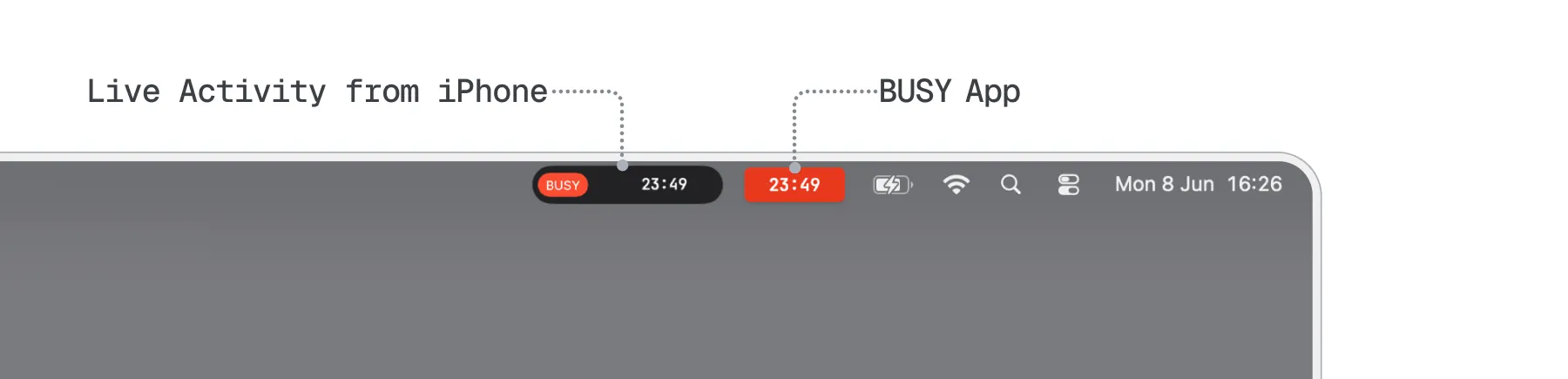
It’s a known issue when a Live Activity from an iPhone duplicates the BUSY App status in the menu bar — we’re working on it. For now, you can remove the activity manually each time it appears. Alternatively, you can disable iPhone Live Activities from appearing on your Mac.
Your Mac will stop receiving Live Activity notifications from your iPhone, such as those from food-delivery and taxi apps.
To disable iPhone Live Activity on your Mac:
On your Mac, go to System Settings → Notifications.
Go to Allow notifications from iPhone.
Turn off Allow Live Activities from iPhone.
If the BUSY app icon is hidden behind your Mac’s notch, move other menu bar icons to make space for it.
Press and hold the Command (⌘) key on your keyboard.
Click and drag a visible menu bar icon to the left, past the notch.
Repeat with other icons until the  app icon appears.
Once the app icon is visible, move it to your preferred position.
The BUSY app icon will remain in its new position even after you restart your Mac.