API tokens
An API token is a unique key that lets apps and services securely connect to your BUSY Bar over the internet.
On this page, you'll learn how to:
- Create an API tokenlink

- Rename a tokenlink
- Delete a tokenlink
Create an API token
In the web browser on your PC, go to cloud.busy.app
Log in to your BUSY account with your email address, or continue with Google, Apple, or Microsoft.
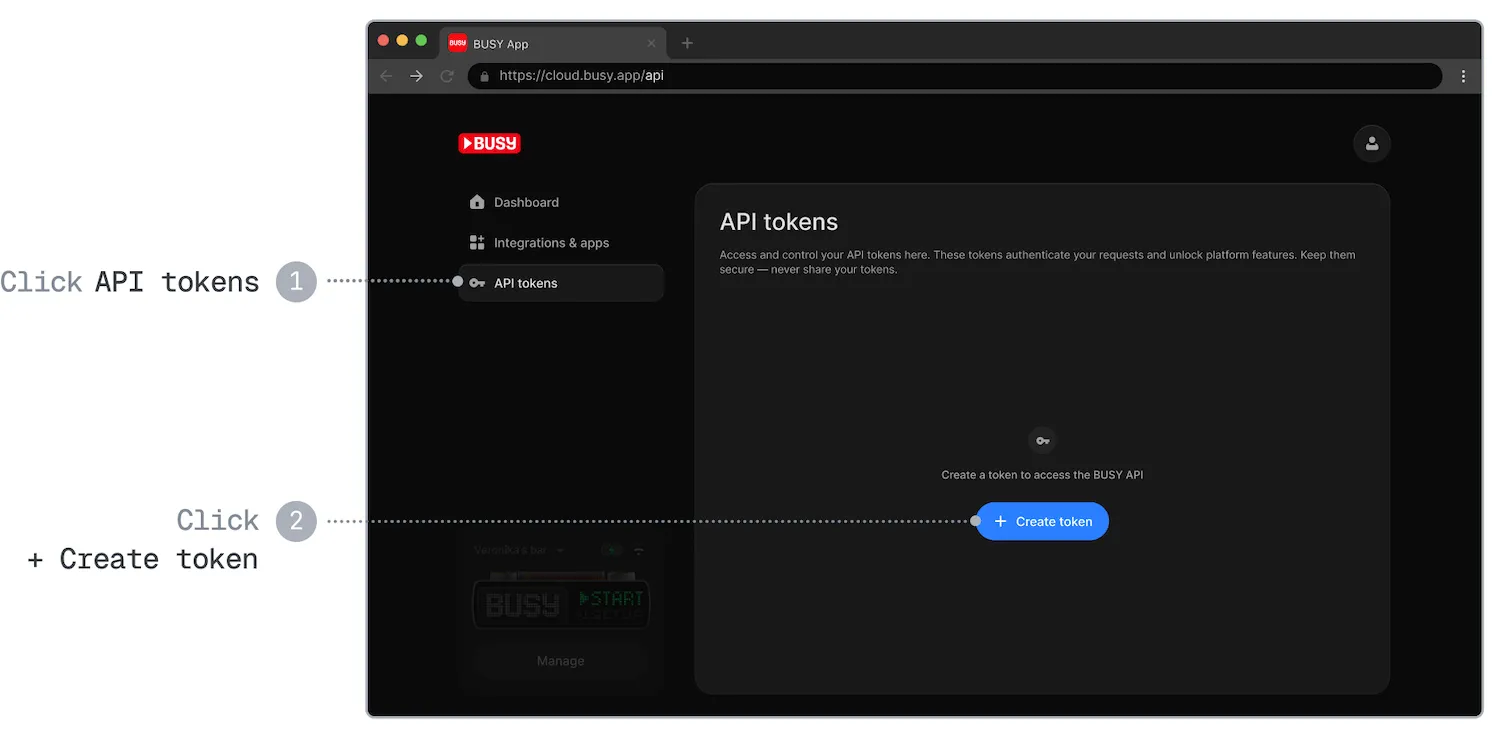
In the API tokens tab, click + Create token.
Enter the Token name.
In the Access scope list, select the scope for this token. The scope determines which API the token can be used with:
- BUSY Bar — remote control of one connected BUSY Bar (BUSY Bar HTTP API).
- Account — timer state and profiles synced across your BUSY account (BUSY account HTTP API).
Click Continue.
Copy and save your API token.
 Save your API token in a secure place
It is shown only once for security reasons, as anyone with the token can make requests on your behalf. If you lose it, you‘ll need to generate a new one.
Rename a token
In the web browser on your PC, go to cloud.busy.app
In the API tokens tab, click the  Edit icon next to the token you want to rename.
In the pop-up, enter the new name and click Save.
Delete a token
Deleting a token is permanent
Once you delete a token, all requests using this token will stop working permanently. Any apps or services that rely on it will no longer work.
In the web browser on your PC, go to cloud.busy.app
In the API tokens tab, click the  Delete icon next to the token you want to delete.
In the pop-up, click Delete token to confirm the action.